Mastodon Feed
Reblogged by kornel ("Kornel"):
_benui@mastodon.gamedev.place ("ben🌱ui") wrote:
How to display and follow multiple hashtags in a single column on #Mastodon
1. Search or click on your first hashtag.
2. Click the Follow Hashtag button.
3. Click Settings in the top-right, then Pin.
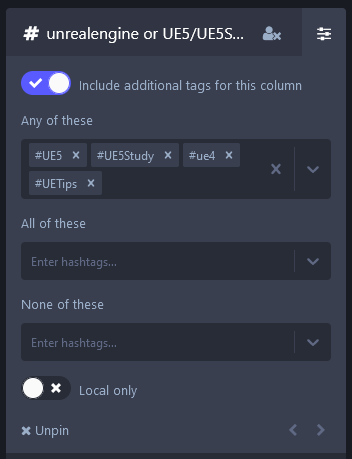
4. In your newly-pinned column, click Settings in the top-right, then check "Include additional tags"
5. In the "Any of these" text box, type in the others you want, hitting enter to confirm each.
Attachments:
- Step 2. Click the "Follow Hashtag" button. It looks like a person with a plus on them. (remote)
- Step 3. Click the Settings button in the top-right, then click Pin. (remote)
- Steps 4 and 5. In the newly-pinned column, click Settings in the top-right, then check "Include additional tags for this column. Then in the "Any of these" input box, add the tags you want, hitting enter to confirm each. (remote)